
 Español
 العربية
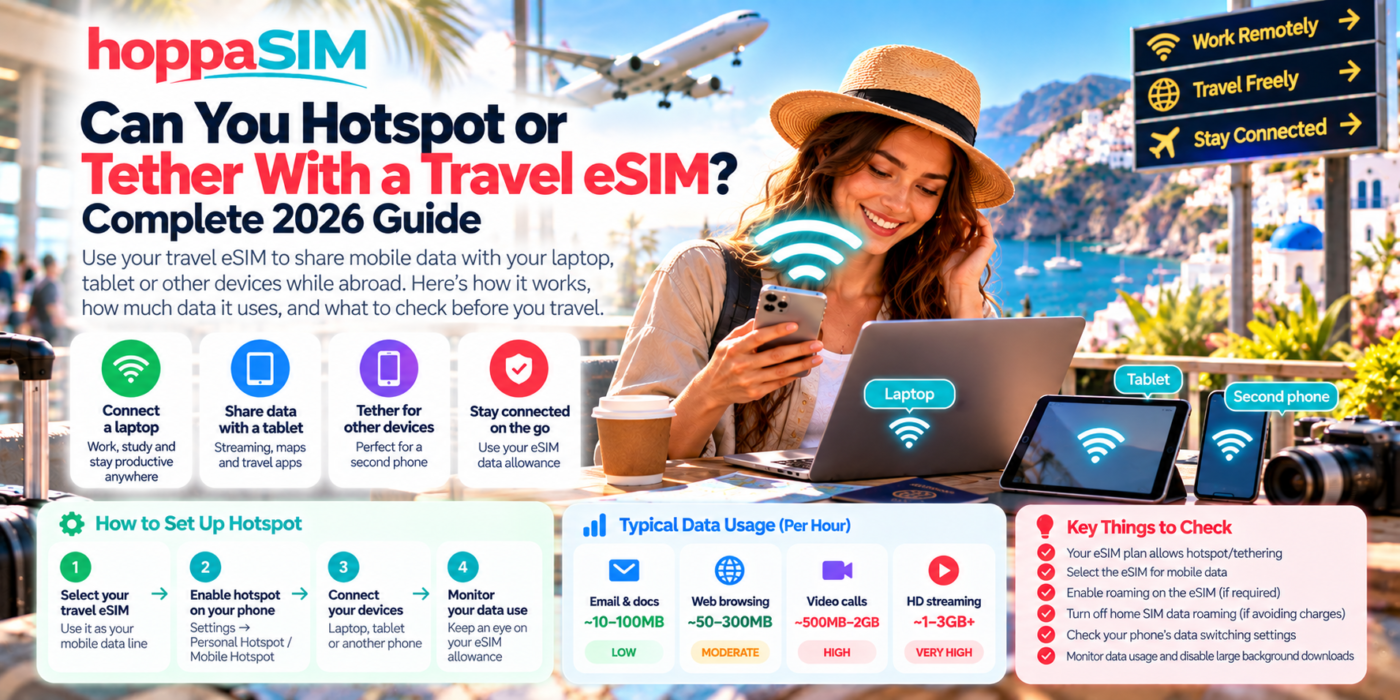
Can You Hotspot or Tether With a Travel eSIM?
In many cases, yes — a travel eSIM can provide the mobile-data connection used by your phone’s Personal Hotspot or tethering feature. However, hotspot availability depends on the specific eSIM plan, your phone and the mobile network, so it is important to check the plan details before relying on it for work or multiple devices.
You can often use hotspot or tethering with a travel eSIM if the particular plan permits it. Your phone uses the eSIM’s mobile-data connection and shares that connection with a laptop, tablet or another device. Check your plan terms first, because tethering rules can vary.
How Does Hotspot Work With a Travel eSIM?
Your travel eSIM connects your phone to a mobile data network.
When you turn on Personal Hotspot or tethering, your phone shares that internet connection with another device.
Your Phone + Travel eSIM
Your HoppaSIM travel eSIM provides the mobile-data connection.
- Mobile network connection
- Travel data allowance
- Phone acts as a small Wi-Fi router
Hotspot vs Tethering: What’s the Difference?
The terms are often used interchangeably, but tethering can describe several ways of sharing your phone’s connection.
Does Every Travel eSIM Allow Hotspot?
No.
Hotspot support can depend on:
- The particular eSIM package
- The underlying network
- The provider’s terms
- Your device
- Any specific tethering restrictions
When Is a Travel eSIM Hotspot Useful?
Does Hotspot Use More Data?
Hotspot itself does not magically multiply your data usage.
The problem is that laptops and tablets can perform much heavier internet activity than a phone.
A connected laptop may automatically:
- Download operating-system updates
- Update applications
- Synchronise cloud files
- Upload photos or documents
- Stream higher-resolution video
- Join video meetings
Example: 10GB Travel eSIM With Hotspot
Imagine you have a 10GB travel plan.
| Activity | Potential impact on 10GB | Travel advice |
|---|---|---|
| Email and basic work | Relatively light | Usually suitable for occasional hotspot use |
| Web browsing | Moderate | Keep an eye on media-heavy websites |
| Cloud synchronisation | Potentially heavy | Pause large sync jobs until Wi-Fi is available |
| Video meetings | Heavy | Several long meetings can use a significant allowance |
| HD video streaming | Very heavy | Better on hotel Wi-Fi where possible |
How to Use a Travel eSIM Hotspot on iPhone
Menu wording can vary slightly between iOS versions.
A common path is:
Settings → Personal Hotspot → Allow Others to Join
If you cannot see Personal Hotspot, first confirm that your eSIM has working mobile data and that the plan supports tethering.
How to Use a Travel eSIM Hotspot on Android
Settings differ between Samsung, Google Pixel and other Android phones.
Look for menus such as:
- Connections
- Network & Internet
- Hotspot & Tethering
- Mobile Hotspot
Does Data Roaming Need to Be On for Hotspot?
If your travel eSIM requires Data Roaming for normal mobile internet, it will generally also need that setting enabled when the phone shares its connection.
The important distinction is:
- Travel eSIM Data Roaming — enable where required
- Home SIM Data Roaming — usually leave off if avoiding home-network data charges
Can You Keep Your Physical SIM Active While Hotspotting From the eSIM?
On many Dual-SIM phones, yes.
Your setup can look like this:
| Line / feature | Purpose |
|---|---|
| Physical home SIM | Keep your normal number available |
| Travel eSIM | Provide mobile data |
| Personal Hotspot | Share the travel eSIM’s internet connection |
| Laptop or tablet | Connect through your phone’s hotspot |
Is a Travel eSIM Hotspot Good Enough for Remote Work?
It can be a useful backup or temporary connection.
Suitability depends on:
- Local mobile coverage
- Network speed
- Congestion
- Data allowance
- Hotspot restrictions
- The type of work you are doing
Light work
Email, documents, messaging and normal web access are generally less demanding.
Heavy work
Video meetings, large downloads, cloud development environments and large file uploads can use substantially more data.
Is Hotspot Slower Than Using the Internet Directly on Your Phone?
It can be.
Hotspot performance can be affected by:
- Mobile network signal strength
- 4G or 5G availability
- Network congestion
- Distance between devices
- Wi-Fi interference
- How many devices are connected
The mobile-data connection is shared, so several connected devices can reduce the performance available to each device.
Can You Connect Multiple Devices?
Many phones allow several devices to join the hotspot at the same time.
However, more connected devices can mean:
- Faster data consumption
- More battery usage
- Lower speed per device
- Greater risk of background downloads
Does Hotspot Drain Your Battery?
Yes, hotspot can use noticeably more battery than normal phone use.
Your phone is simultaneously:
- Maintaining a mobile-network connection
- Creating a Wi-Fi network
- Transferring data between devices
For longer hotspot sessions, keep a charger or power bank available.
Is Using Your Own Hotspot Safer Than Public Wi-Fi?
Using your own mobile hotspot can reduce your reliance on open public Wi-Fi networks.
You should still:
- Use a strong hotspot password
- Do not share the password publicly
- Turn the hotspot off when finished
- Check which devices are connected
How to Stop Your Laptop Using Too Much Travel Data
Before connecting your laptop to a travel hotspot:
- Pause cloud synchronisation.
- Pause automatic software updates.
- Avoid HD streaming.
- Close applications you are not using.
- Use lower-quality video during meetings if appropriate.
- Check your data usage regularly.
Travel eSIM Hotspot Not Working? Try These Fixes
Open a website on the phone itself. If the phone has no internet, the hotspot will not have internet either.
On Dual-SIM phones, your hotspot may be sharing whichever line is currently selected as the data SIM.
Enable Data Roaming on the travel eSIM if your specific plan requires it.
If the option exists but devices cannot use data, verify the plan’s tethering rules.
Turn Personal Hotspot off and on again, then reconnect the other device.
Restarting can refresh both the mobile-data connection and hotspot service.
On the laptop or tablet, remove the saved hotspot network and join again.
What Should You Check Before Buying an eSIM for Hotspot Use?
How Much Data Should You Buy for Hotspot Use?
If hotspot is only an emergency backup, you may not need a huge allowance.
If you plan to connect a laptop every day, consider a larger package.
| Hotspot use | Possible plan approach | Examples |
|---|---|---|
| Occasional backup | Smaller allowance may be enough | Email, quick browsing, emergency work |
| Regular light work | Medium allowance | Email, documents, business apps |
| Frequent remote work | Larger allowance | Cloud tools, meetings and file transfers |
| Heavy streaming / multiple devices | Large allowance required | HD video, gaming downloads, several connected devices |
Frequently Asked Questions
Can I use hotspot with a travel eSIM?
Can I connect my laptop to my eSIM?
Does hotspot use my eSIM data allowance?
Does tethering use more data?
Can I hotspot from a data-only eSIM?
Can I keep my normal SIM active while using eSIM hotspot?
Why is Personal Hotspot missing on my iPhone?
Can I use a travel eSIM hotspot for Zoom or Teams?
Can multiple devices use the same eSIM hotspot?
Is hotspot suitable for a full day of remote work?
The Bottom Line
A travel eSIM can often be used as the internet source for your phone’s hotspot or tethering feature.
This can be extremely useful for connecting a laptop, tablet or second phone while travelling.
However, tethering support depends on the exact plan, so check before purchasing if hotspot access is important.
Also remember that connected computers can consume much more data than normal smartphone use because of video calls, large downloads and background cloud synchronisation.
For reliable travel hotspot use, choose a suitable allowance, monitor your data and make sure your travel eSIM — rather than your home SIM — is selected as the phone’s mobile-data line.
Need travel data for your phone, tablet or laptop?
Browse HoppaSIM plans for your destination and choose enough data for the way you travel. If hotspot is important, check the exact plan details before purchasing.