
 Español
 العربية
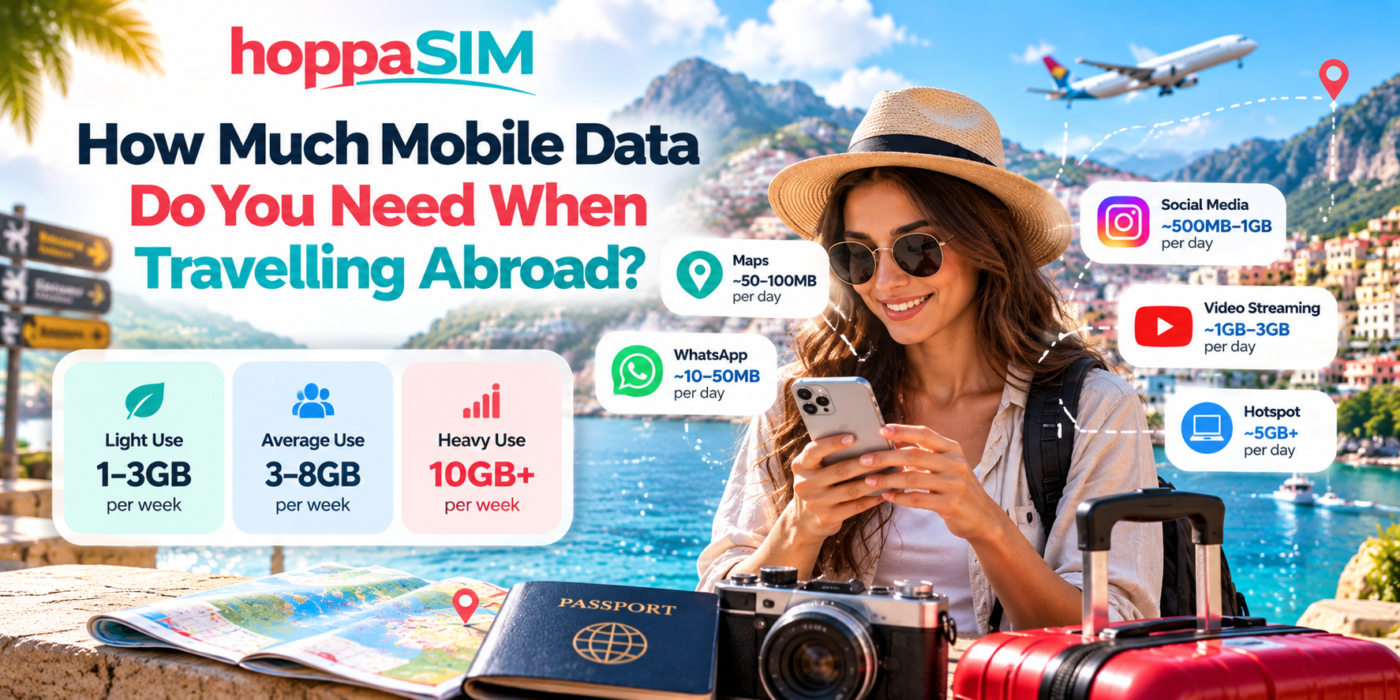
How Much Mobile Data Do You Need When Travelling Abroad?
Choosing the right travel eSIM data allowance can save you money and prevent you from running out of data halfway through your trip. This guide explains how much data common travel apps use, how many GB you may need for a weekend, one week or two weeks abroad, and how to reduce your mobile-data usage while travelling.
For many travellers, around 3GB to 5GB for one week can be enough for maps, messaging, email, browsing and moderate social-media use. If you stream video regularly, upload lots of photos or videos, or use your phone as a hotspot, you may need 10GB, 20GB or more. Your actual usage can vary significantly depending on app settings and how often you use Wi-Fi.
How Much Data Do You Need? Light vs Average vs Heavy Use
The easiest way to choose a travel eSIM package is to think about how you normally use your phone.
Basic travel use
1–3GB / weekSuitable for travellers who mainly use their phone for essential tasks.
- WhatsApp messages
- Google Maps
- Checking bookings
- Occasional web browsing
- Very little video
Everyday travel use
3–8GB / weekA good range for people who use their phone throughout the day.
- Maps and navigation
- WhatsApp calls
- Instagram / Facebook
- Web browsing
- Photo uploads
- Some short-form video
Streaming & hotspot use
10GB+ / weekConsider a larger allowance if mobile data replaces Wi-Fi for much of your trip.
- Frequent TikTok / Reels
- YouTube streaming
- Video calls
- Cloud backups
- Hotspot use
- Large uploads
How Much Mobile Data Do Popular Travel Apps Use?
Different apps can use dramatically different amounts of data.
Messaging and navigation usually consume relatively little data, while video streaming and social-media feeds can use much more.
| Activity | Typical data impact | Travel advice |
|---|---|---|
| Text messaging apps | Low | Text-only WhatsApp and Messenger use relatively little data. |
| Low | Normal email is light unless downloading large attachments. | |
| Google Maps | Low | Navigation is usually efficient, especially if maps are downloaded offline. |
| Web browsing | Low–Medium | Image-heavy websites use more data than simple pages. |
| Music streaming | Medium | Download playlists over Wi-Fi before travelling where possible. |
| Medium–High | Reels and automatically loading videos can increase usage quickly. | |
| TikTok | High | Continuous short-form video can use large amounts of data. |
| YouTube / streaming video | High | Video quality has a major effect on usage. |
| Video calls | High | Long FaceTime, WhatsApp or Zoom calls can consume data quickly. |
| Mobile hotspot | Potentially very high | Laptops and tablets may download updates and background content. |
How Much Data Do Google Maps and Navigation Use?
Navigation apps are often one of the most important tools when travelling, but they generally use less data than video and social-media apps.
Data is used when the app loads:
- Maps
- Traffic information
- Business listings
- Images
- Route updates
- Search results
Download offline maps before travelling
One of the easiest ways to reduce travel data usage is to download the destination area over Wi-Fi before your trip.
Your phone can then use GPS for positioning while relying less on mobile data to load the basic map.
Does WhatsApp Use Much Data Abroad?
Normal text messages use very little data.
Usage increases when you:
- Send or receive photos
- Download videos
- Send voice notes
- Make voice calls
- Make video calls
For most travellers who mainly use WhatsApp for text messages, directions and occasional photos, it is unlikely to be the largest source of data use.
How Much Data Does Social Media Use Abroad?
Social-media usage can vary enormously because modern feeds include large images, automatically loading videos, Stories, Reels and livestreams.
Browsing photos is usually less intensive than spending long periods watching Reels. Uploading high-resolution photos and videos also increases usage.
TikTok
TikTok is largely video-based, so extended scrolling can consume travel data quickly.
Data usage depends heavily on whether your feed contains video, high-resolution images or livestreams.
How Much Data Does YouTube and Video Streaming Use?
Video is one of the fastest ways to use a travel data allowance.
The amount depends heavily on video quality.
| Video behaviour | Data impact | Recommendation |
|---|---|---|
| Occasional short clips | Moderate | Usually manageable on a normal travel plan. |
| Long videos at low quality | Medium–High | Lower playback quality when using mobile data. |
| HD video | High | Prefer Wi-Fi if you have a limited plan. |
| 4K / very high-quality video | Very high | Avoid on limited travel data unless necessary. |
How Much Data Do You Need for Different Trip Lengths?
The following ranges can help you choose a starting point. They assume typical travel use rather than constant video streaming.
Does Using a Hotspot Use More Data?
A hotspot does not automatically make each megabyte larger, but it can make it much easier to use data quickly.
When you connect a laptop or tablet to your phone, that device may:
- Download operating-system updates
- Sync cloud files
- Load desktop versions of websites
- Back up photos
- Stream higher-quality video
- Download large attachments
If you expect to work remotely using your phone’s hotspot, choose a larger data package than you would for normal smartphone use.
Hidden Data Usage: Background Apps
Not all mobile-data use comes from apps you are actively looking at.
Phones may use data in the background for:
- Automatic app updates
- Cloud photo backups
- Email syncing
- System updates
- Podcast downloads
- Music downloads
- Social-media preloading
Disabling unnecessary background activity can make a significant difference on a limited travel plan.
How to Use Less Mobile Data While Travelling
Which eSIM Data Plan Should You Choose?
Start with three questions:
- How long will you be travelling?
- Will you have reliable Wi-Fi at your hotel or accommodation?
- Will you mainly use maps and messaging, or video and social media?
A traveller using hotel Wi-Fi every evening and mobile data mainly for maps and messaging may be comfortable with a smaller plan.
A traveller who uses TikTok, Instagram, YouTube, video calls and hotspot regularly should consider significantly more data.
Do You Need an Unlimited Travel eSIM?
Not everyone needs unlimited data.
An unlimited or very large package can be useful if you:
- Stream video frequently
- Work remotely
- Use hotspot heavily
- Make frequent video calls
- Upload large files
- Do not expect reliable Wi-Fi
For lighter travellers, a fixed-data package may provide all the connectivity required.
How to Check How Much Mobile Data You Are Using
Both iPhone and Android provide mobile-data usage information in their settings.
On iPhone
Open:
Settings → Mobile Service / Cellular
You can review mobile-data usage and see which apps have used data.
On Android
The exact path differs by manufacturer, but look for:
Settings → Network / Connections → Data Usage
This can help you identify apps consuming more data than expected.
Frequently Asked Questions
Is 1GB enough for travelling?
Is 3GB enough for a week abroad?
Is 5GB enough for a week of travel?
Is 10GB enough for two weeks abroad?
Does Google Maps use a lot of mobile data?
Does WhatsApp use a lot of data?
Does TikTok use a lot of mobile data?
Does YouTube use a lot of data abroad?
Can I use my eSIM as a hotspot?
What happens if I run out of eSIM data?
How Many GB Should You Buy for Your Trip?
There is no single travel-data allowance that suits everyone.
For light users, a small package may be enough for maps, WhatsApp, email and booking information.
For average travellers, a mid-sized plan gives more freedom to browse, upload photos and use social media.
Heavy users who stream video, use a hotspot or work remotely should consider larger or unlimited options where suitable.
The best approach is to estimate your daily usage, multiply it by the length of your trip, and leave some extra allowance for unexpected use.
Choose the right amount of travel data
Browse HoppaSIM eSIM plans for your destination and choose a data allowance that matches the length of your trip and the way you use your phone. If you’re unsure, consider a little extra data so you have flexibility while travelling.