
 Español
 العربية
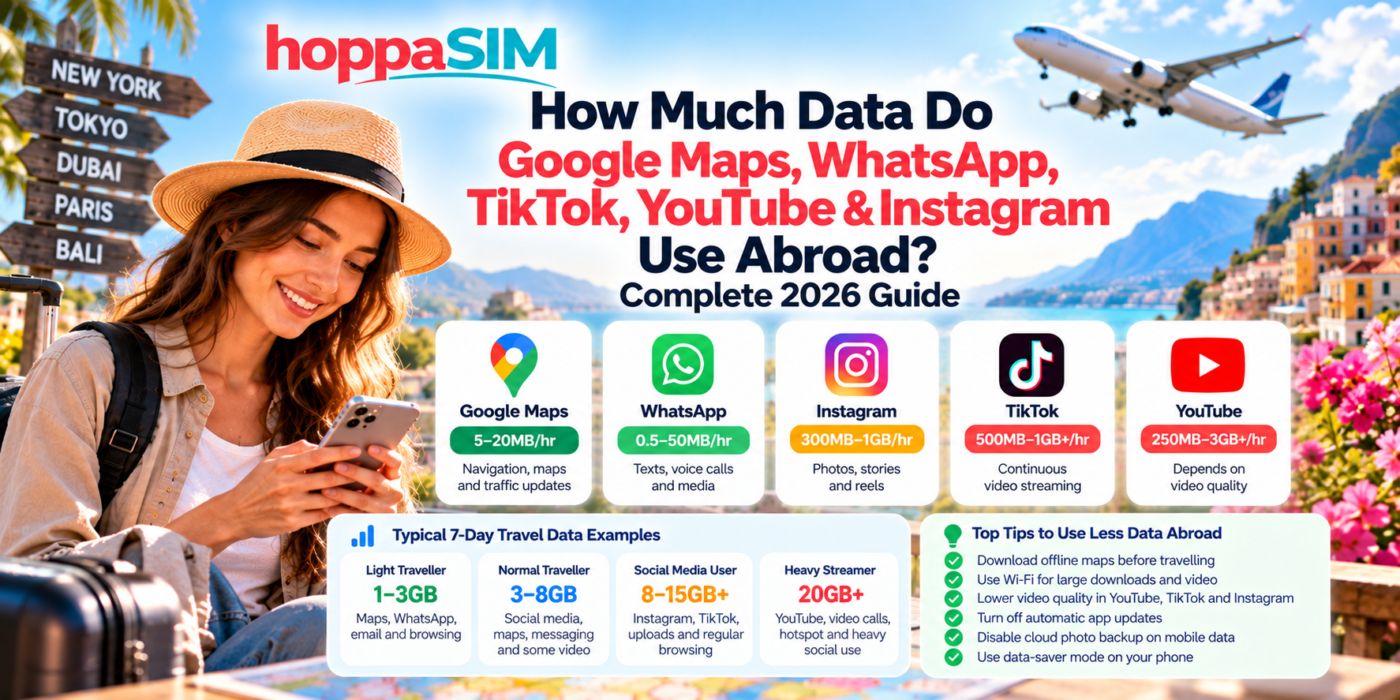
How Much Data Do Google Maps, WhatsApp, TikTok, YouTube & Instagram Use Abroad?
Some travel apps use almost no data, while others can consume several gigabytes in just a few hours. This guide compares the approximate mobile-data usage of the apps travellers use most and shows how to make your eSIM allowance last longer.
Maps, messaging and email generally use relatively little data. Social-media feeds use more because they continuously load photos and video. Video streaming and video calls are usually the biggest data users. Your exact usage depends heavily on quality settings, autoplay and how long you use each app.
Quick Data Usage Comparison
Approximate Mobile Data Used by Popular Travel Apps
| App / activity | Approximate usage | Impact | Main reason |
|---|---|---|---|
| Google Maps navigation | About 5–20MB per hour | Low | Mostly map data, routes and traffic updates |
| WhatsApp text messages | Very small amounts | Very low | Plain text requires little data |
| WhatsApp voice call | Roughly 20–50MB per hour | Low | Compressed audio stream |
| WhatsApp video call | Roughly 200–500MB+ per hour | Medium–High | Live video and audio |
| Instagram browsing | About 300MB–1GB per hour | High | Photos, Stories and Reels |
| TikTok | About 500MB–1GB+ per hour | High | Continuous short-form video |
| YouTube low quality | About 250–500MB per hour | Medium | Lower-resolution streaming |
| YouTube HD | About 1–3GB+ per hour | Very high | High-resolution video |
| Music streaming | About 40–150MB per hour | Low–Medium | Audio bitrate |
| Web browsing | About 50–150MB per hour | Low–Medium | Images, ads and webpage content |
| Usually very low | Low | Higher only with large attachments | |
| Video conferencing | About 500MB–2GB+ per hour | Very high | Live two-way video and audio |
How Much Data Does Google Maps Use?
Usually one of the lighter travel appsGoogle Maps is generally very efficient compared with streaming or social-media apps.
Data may be used for:
- Downloading map sections
- Searching for places
- Live traffic information
- Business details
- Route recalculations
How Much Data Does WhatsApp Use?
Text is light; video calls are much heavierText messaging uses very little data.
Your usage increases when you:
- Send photos
- Receive large videos
- Send voice notes
- Make voice calls
- Make video calls
How Much Data Does Instagram Use?
Can become a major data user while travellingInstagram can use much more data than users expect because modern feeds include high-resolution images and automatically playing video.
The biggest data users are usually:
- Reels
- Stories
- Video posts
- Livestreams
- Uploading videos
A traveller who browses Instagram for an hour every day can easily use several gigabytes over a one-week holiday.
How Much Data Does TikTok Use?
One of the heaviest everyday mobile-data appsTikTok continuously loads the next videos in your feed, which makes it one of the faster ways to use a travel data allowance.
Around an hour of continuous viewing can potentially use hundreds of megabytes or more than 1GB depending on video quality and app behaviour.
How Much Data Does YouTube Use?
Video quality makes a huge differenceYouTube usage can vary enormously because the app supports everything from low-resolution mobile video to high-definition and 4K streams.
| Video quality | Approximate hourly use | Travel impact |
|---|---|---|
| Low quality | About 250–500MB | Manageable with a reasonable allowance |
| Standard quality | About 500MB–1GB | Can use several GB over a trip |
| HD | About 1–3GB+ | Heavy usage |
| Very high / 4K | Several GB per hour | Best avoided on limited travel data |
How Much Data Does Music Streaming Use?
Music uses much less data than video, but daily streaming can still add up over a long holiday.
Depending on audio quality, music streaming may use roughly 40–150MB per hour.
Download playlists over Wi-Fi before travelling if you want to reduce mobile-data use.
How Much Data Do Video Calls Use?
Video calls are another major source of travel-data usage.
The exact amount depends on:
- Video resolution
- Number of participants
- Connection quality
- App compression
- Call duration
An hour-long video meeting can potentially consume hundreds of megabytes or more than 1GB.
Example: How Much Data Could You Use on a 7-Day Holiday?
These examples show why two travellers can need completely different data packages.
What Can You Do With 1GB of Travel Data?
1GB can go a long way if you mainly use light apps.
It could potentially cover:
- Many hours of basic map navigation
- Large numbers of WhatsApp text messages
- Regular email and web searches
- Some social-media browsing
But the same 1GB could disappear much faster with:
- High-definition YouTube
- TikTok
- Instagram Reels
- Video calls
Is 5GB Enough for a Week Abroad?
For many average travellers, 5GB can be a practical amount for a one-week holiday if hotel Wi-Fi is also available.
It can usually give you plenty of room for:
- Maps
- Web browsing
- Photo uploads
- Moderate social media
Heavy TikTok, YouTube or video-call use could still consume it quickly.
Is 10GB Enough for a Trip?
10GB gives much more flexibility for normal travel use.
It may suit travellers who:
- Spend more time on social media
- Upload photos regularly
- Make internet calls
- Use navigation throughout the day
- Watch occasional videos
Heavy HD streaming can still use 10GB surprisingly quickly.
Apps Can Use Data Even When You Are Not Using Them
Background activity can make your usage higher than expected.
Common examples include:
- Cloud photo backup
- Automatic app updates
- Podcast downloads
- Email synchronisation
- Social-media preloading
- Operating-system updates
9 Ways to Use Less Mobile Data Abroad
How to Check Data Usage on iPhone
Open:
Settings → Mobile Service / Cellular
Scroll down to see how much mobile data individual apps have used.
You can also disable mobile-data access for apps you do not want using your travel allowance.
How to Check Data Usage on Android
Menu names vary by manufacturer, but look for:
Settings → Network / Connections → Data Usage
Many Android phones can also set:
- Data warnings
- Usage limits
- Background-data restrictions
- Data Saver mode
Frequently Asked Questions
How much data does Google Maps use per hour?
Does WhatsApp use a lot of travel data?
How much data does TikTok use per hour?
How much data does Instagram use per hour?
How much data does YouTube use?
Is 1GB enough for Google Maps and WhatsApp?
Is 5GB enough for a one-week holiday?
Which apps use the most data while travelling?
Can I reduce TikTok and Instagram data usage?
Do apps use data in the background?
The Bottom Line
The biggest difference in travel-data usage comes from what you do with your phone, not simply how long you are abroad.
Google Maps, WhatsApp messages and email are relatively light.
TikTok, Instagram Reels, YouTube and video calls can use dramatically more data.
If you mainly need maps and messaging, a smaller travel eSIM package may be enough. If you stream video and use social media heavily, choose a larger allowance.
The easiest way to make your data last longer is to download what you can before travelling, use Wi-Fi for heavy content and monitor which apps are consuming your allowance.
Choose enough data for the apps you actually use
Browse HoppaSIM travel eSIM plans and choose an allowance based on your trip length and whether you mainly use maps and messaging or heavier apps such as TikTok, Instagram and YouTube.